4/7-4/11
- Kimberly Dao
- Apr 10, 2025
- 2 min read

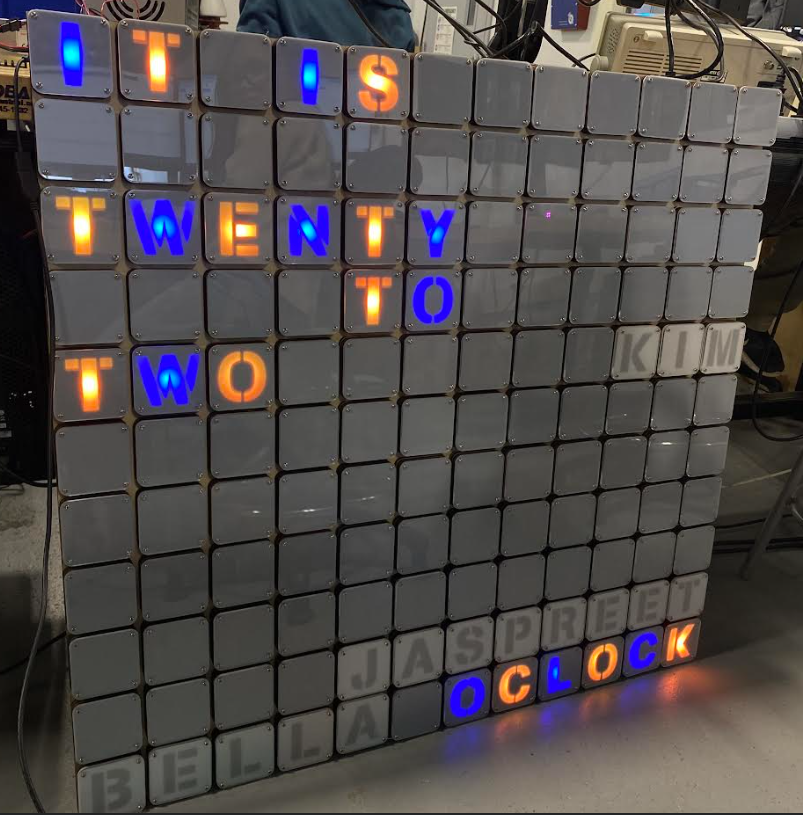
This week, I worked with Mr. Christy on the Word Clock code. We both cleaned up the code to make it shorter and commented on it to make it more readable. The code overall is now shorter and easier to understand the code. After we cleaned up the code, I had an idea of multiple colors. Mr. Christy showed me that I can use modulus as a way to indicate every time the value is % n, then if the remainder is 0 then that LED will be a different color. Every even LED would become a different color while the other ones who weren't was a different color.
Word Clock Code
void mytime() {
  pixels.clear();
  int counter = minutes / 5;

  // Helper words (it is and o'clock)
  for (int y = helpers[0][0]; y < helpers[0][1]; y++) {  //For IT IS
    //  pixels.setPixelColor(y, pixels.Color(50, 0, 50));
    pixels.setPixelColor(y, 0xff);
  }
  for (int y = helpers[1][0]; y < helpers[1][1]; y++) {  //For O'CLOCK
    //pixels.setPixelColor(y, pixels.Color(50, 0, 50));
    pixels.setPixelColor(y, 0xff);
  }

  // Helper words (past and to)
  if (counter <= 6) {
    for (int y = helpers[3][0]; y < helpers[3][1]; y++) {  //PAST
      // pixels.setPixelColor(y, pixels.Color(50, 0, 50));
      pixels.setPixelColor(y, 0xff);
    }
  } else {
    for (int y = helpers[2][0]; y < helpers[2][1]; y++) {  //TO
      // pixels.setPixelColor(y, pixels.Color(50, 0, 50));
      pixels.setPixelColor(y, 0xff);
    }
  }

  // Minute words
  for (int y = minuteWords[counter][0]; y < minuteWords[counter][1]; y++) {  //Show minutes
    //pixels.setPixelColor(y, pixels.Color(50, 0, 50));
    pixels.setPixelColor(y, 0xff);
  }
Mr. Christy introduced me to his clock code that worked with 0xff. 0xff is a null value. It doesn't have a value but can hold a value.
Colors
void colors() {
  for (int y = 0; y < 90; y++) {
    if (pixels.getPixelColor(y) == 0xff) {

      if (y % 2) {  //Every even LED turns color below
        pixels.setPixelColor(y, pink);
      } else {
        pixels.setPixelColor(y, green);
      }

    } else {
      pixels.setPixelColor(y, pixels.Color(0, 0, 0));
    }
  }
}I made values of pixel colors through "uint32_t". This works as an int and it allows me to insert the words instead of typing out the values of certain colors. After having that figured out and multiple colors to work with, Jaspreet and Bella both thought of an idea of making color pairs corresponding to the month. Mr. Christy suggested to making an esp32 server as a way to control it, similar to a project done by Sasha. The code overall has made great progress however, when I was researching about creating a Daylight saving code. The RTC_PCF8523 is not able to keep up with the change of Daylight saving because of its chip. There was a way to code it but it would be tedious. I haven't asked Mr. Christy for help but then I went to focus on the esp32 server. It was also hard to understand at first.




Comments