9/8-9/12
- Kimberly Dao
- Sep 11, 2025
- 3 min read

Monday
On Monday, I created a goal sheet to plan out my days for the word clock. After creating that, we had PE which took time off. When I returned back to Robotics for last period, I was able to create a new button through the index and style for Halloween. I created a new color scheme for this button and plugged it into the code. After, adding Halloween I decided to create notes and comments into the code and my notebook for people to understand the code. The code isn't messy, I believe the functions being used might cause people to be confused at first.
Tuesday
On Tuesday, I continued to work on the code through making comments and writing notes. I saved it and pushed that new update to origin through Github. The code is officially done and it works very well. I also finished fully commenting on the code in Arduino. However, while letting the work clock to run by itself, the time it actually will reset and also change colors through pressing the buttons on the webserver is delayed. I've been playing around with numbers and trying to change it where it wouldn't be one because it will simply cause the LEDs to flash endlessly. I haven't really found anything yet how to fix it or improve it just yet.
// Webserver address is 192.168.0.64/wordclock, you MUST use EngineeringSubNet as your device's wifi.
// Make sure your device as esp32 by Espessif Systems installed in Boards Manager.
// IMPORTANT: check if your machine as Arduino AVR Boards installed
#include "Adafruit_NeoPixel.h"
#include "Wire.h"
#include "WiFi.h"
#include "ESPAsyncWebServer.h"
//If you are having trouble with ESPAsyncWebServer, search it from Library Manager install it from ESP32Async
#include "AsyncTCP.h"
// If you are having trouble with AsyncTCP, search it from Library Manager install it from ESP32Async.
#include "LittleFS.h"
// IMPORTANT: If your machine cannot upload with LittleFS then follow the tutorial from Random Nerd Tutorial. https://randomnerdtutorials.com/esp32-littlefs-arduino-ide/
#include "NTPClient.h"
// If you are missing NTPClient, search it from Library Manager and install it from Fabrice Weinberg.
Wednesday
On Wednesday, I was writing notes for the code just in case. It has extra but similar notes that I provided in the code. It has the most important notes about the LittleFS Uploader. It shows the rough steps but mostly on installing it and how to access and check if your machine has it. I had also started to work on the first part of the PCB.
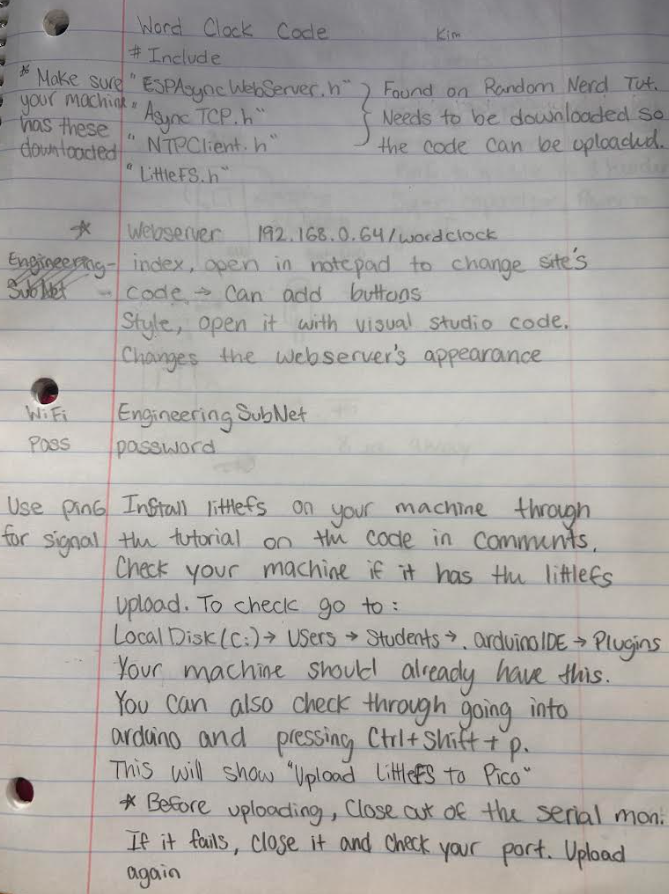
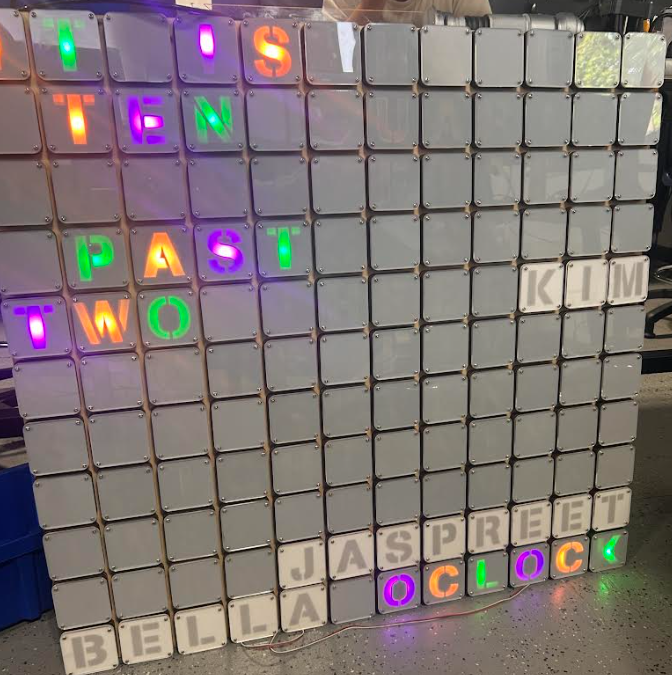
I also forgot to mention the new color and button I created for a holiday. I decided to add Halloween. Halloween is a holiday everyone enjoys and Jaspreet and Bella recommended it to me when I asked them if they wanted any other different colors. It doesn't look really good on camera but in person it looks great.
Thursday
On Thursday, I decided o recheck the code and try to fix the issue of the time that is allowed the word clock to function at a certain amount of time.
  if ((minutes % 2) == 0) {
    increments = minutes / 1;
    Serial.println("Change");
    setColors();
    wordclocktime();
    delay(1000);
  }
It's not perfect as it still has a delay of changing the colors at a specific amount of minutes. While trying to test out those values, it stopped cycling through colors. I'm stumped and I was waiting a couple of minutes to see the colors cycle through but it hasn't started yet. After I reset the ESP32, it still did not work. After a really long time, it decided to cycle through the colors. It's very confusing. I am unsure if it is a code issue.


Comments